> ## Documentation Index
> Fetch the complete documentation index at: https://docs.intention.xyz/llms.txt
> Use this file to discover all available pages before exploring further.
# Deposit
> Getting collateral into the account you trade from — the faucet, and the bridge path from another chain.
You trade against collateral held in your Intention account. This page covers getting it there.
## From the faucet
The fastest way to get collateral is the faucet at [faucet.intention-testnet.xyz](https://faucet.intention-testnet.xyz). Connect the same wallet you use on the exchange and request funds — they arrive in the account you trade from.
See [What is Intention](/help/what-is-intention) for what faucet collateral is and is not.
## From another chain
The `Deposit` button in the account panel on the right of the trading screen opens the bridge flow.
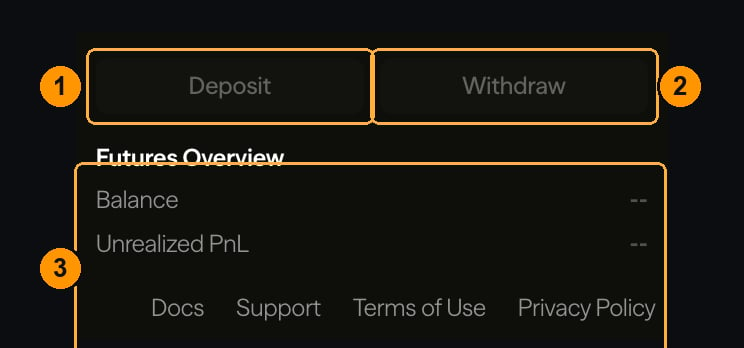 The dialog lists what is currently supported. That list is authoritative — it changes as routes are added.
Funds are locked in the bridge contract on the source chain.
Intention validators observe the source chain and credit your account once its confirmation requirement is met. The wait is the source chain's finality, not Intention's.
The credit appears under **Balances** at the bottom of the trading screen, and in `Available to Trade` in the order ticket.
## What a deposit costs
**Nothing, from the protocol.** Deposits are free — you pay the source chain's gas to send the transaction, and the full amount you locked becomes tradeable collateral.
There is a **minimum deposit**, so a transfer cannot be smaller than the cost of processing it. See [Non-trading fees](/programs/other-fees).
## What happens the moment it lands
A credited deposit is an ordinary protocol transaction, which has a consequence worth knowing if you are topping up a position in trouble: it takes effect in the same execution step everything else does.
Margin restored by a deposit is visible to the risk engine immediately — not after a reconciliation pass. A deposit that arrives before your position reaches its maintenance requirement counts. See [Clearinghouse](/protocol/architecture/clearinghouse).
That said, do not rely on it. Bridge deposits wait on another chain's finality, and a fast market can reach your liquidation price long before the confirmations land.
**Send only supported assets, on supported chains, to the address the dialog gives you.** Funds sent on the wrong chain, or in an unsupported asset, are usually unrecoverable — nobody has a key that can spend them. Verify the chain in your wallet, not just the address: the same address string is valid on many chains and leads to different accounts on each.
Test a new route with a small amount first. See [Wrong network or asset](/help/wrong-network-or-asset).
## If it does not arrive
Deposits are not instant, and slow is normal before it is a problem. The wait-versus-escalate criteria are on [Deposit not credited](/help/deposit-not-credited).
## Where to go next
Putting the collateral to work.
The path back out.
When to wait and when to raise a ticket.
How the crossing actually works.
The dialog lists what is currently supported. That list is authoritative — it changes as routes are added.
Funds are locked in the bridge contract on the source chain.
Intention validators observe the source chain and credit your account once its confirmation requirement is met. The wait is the source chain's finality, not Intention's.
The credit appears under **Balances** at the bottom of the trading screen, and in `Available to Trade` in the order ticket.
## What a deposit costs
**Nothing, from the protocol.** Deposits are free — you pay the source chain's gas to send the transaction, and the full amount you locked becomes tradeable collateral.
There is a **minimum deposit**, so a transfer cannot be smaller than the cost of processing it. See [Non-trading fees](/programs/other-fees).
## What happens the moment it lands
A credited deposit is an ordinary protocol transaction, which has a consequence worth knowing if you are topping up a position in trouble: it takes effect in the same execution step everything else does.
Margin restored by a deposit is visible to the risk engine immediately — not after a reconciliation pass. A deposit that arrives before your position reaches its maintenance requirement counts. See [Clearinghouse](/protocol/architecture/clearinghouse).
That said, do not rely on it. Bridge deposits wait on another chain's finality, and a fast market can reach your liquidation price long before the confirmations land.
**Send only supported assets, on supported chains, to the address the dialog gives you.** Funds sent on the wrong chain, or in an unsupported asset, are usually unrecoverable — nobody has a key that can spend them. Verify the chain in your wallet, not just the address: the same address string is valid on many chains and leads to different accounts on each.
Test a new route with a small amount first. See [Wrong network or asset](/help/wrong-network-or-asset).
## If it does not arrive
Deposits are not instant, and slow is normal before it is a problem. The wait-versus-escalate criteria are on [Deposit not credited](/help/deposit-not-credited).
## Where to go next
Putting the collateral to work.
The path back out.
When to wait and when to raise a ticket.
How the crossing actually works.