> ## Documentation Index
> Fetch the complete documentation index at: https://docs.intention.xyz/llms.txt
> Use this file to discover all available pages before exploring further.
# Reading the order book
> Bids, asks, the spread, and what depth tells you about the price you will actually get.
The order book is every resting order in the market, sorted by price. It is the liquidity your order will trade against.
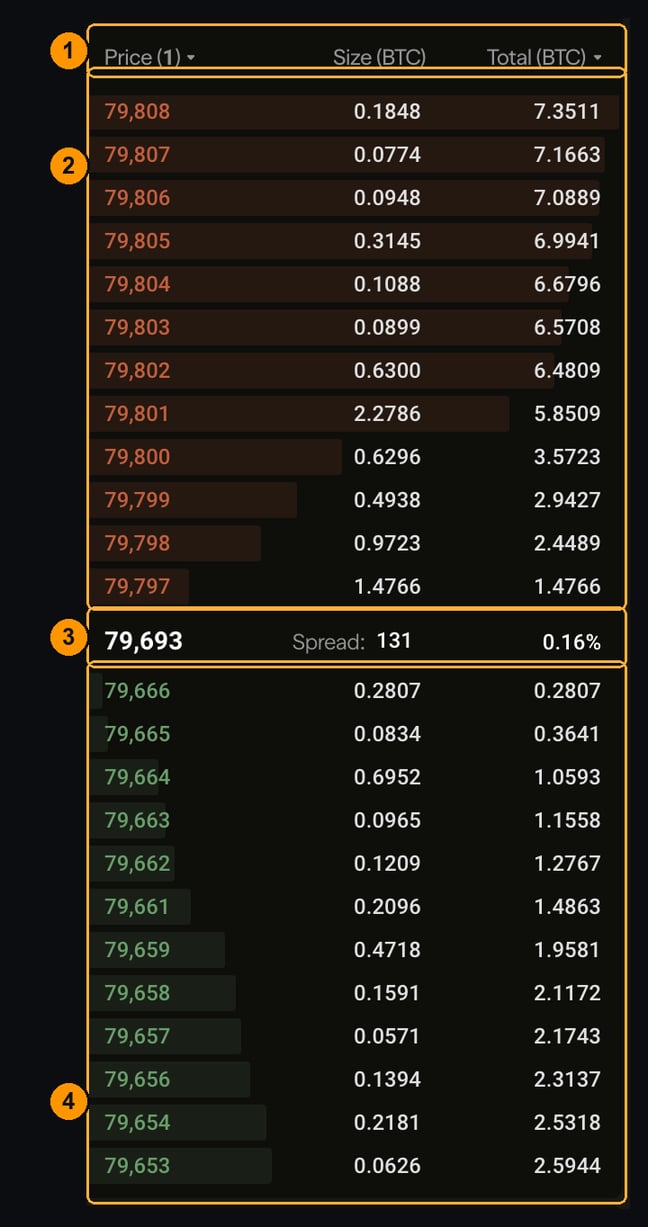 **1 — Columns.** `Price`, `Size`, and `Total`. Size is the amount resting at that single price; **Total is cumulative** — it sums everything from the top of the book down to that row. The dropdown on `Price` changes the grouping, bundling nearby prices into wider buckets.
**2 — Asks (sell orders), in red.** Prices people will sell to you at. They ascend away from the middle, so the **lowest** ask sits closest to the spread — that is the best price you can buy at right now.
**3 — The spread.** The gap between the best bid and the best ask, with the current price. A tight spread means a liquid market; a wide one means buying and immediately selling would cost you real money.
**4 — Bids (buy orders), in green.** Prices people will buy from you at. The **highest** bid sits closest to the spread — the best price you can sell at right now.
## What the shading means
The tinted bar behind each row shows size relative to the rest of the book. A row that extends further has more resting there.
This is worth reading before a large market order. A big bar three levels down means your order will fill through the thin levels above it and land on that one — and your average price will reflect all of them, not just the top.
## Using it to price an order
**Buying?** Look at the asks. **Selling?** Look at the bids. Your side of the trade is the *opposite* side of the book.
To estimate what a market order will actually cost, read down the `Total` column until it reaches your size. The price on that row is roughly your worst fill, and your average lands somewhere between it and the top of the book. That difference is [slippage](/help/order-ticket#read-this-before-you-sign), and the ticket estimates it for you.
The book shows resting **limit** orders only. It cannot show you what is about to arrive, and in a fast market the depth you priced against can be gone by the time your order executes. A book that looks deep is not a guarantee — it is a snapshot.
## Trades
The `Trades` tab beside the book shows what has actually executed: price, size, and time.
Book and trades answer different questions. The book is intent — what people are *willing* to do. Trades are outcome — what they actually did. A book that looks deep with no trades printing is a market where nobody is crossing the spread.
## Where to go next
Turning what you read into an order.
Price-time priority and how matching works.
Why your P\&L does not use the last trade.
When the book and your fill disagree.
**1 — Columns.** `Price`, `Size`, and `Total`. Size is the amount resting at that single price; **Total is cumulative** — it sums everything from the top of the book down to that row. The dropdown on `Price` changes the grouping, bundling nearby prices into wider buckets.
**2 — Asks (sell orders), in red.** Prices people will sell to you at. They ascend away from the middle, so the **lowest** ask sits closest to the spread — that is the best price you can buy at right now.
**3 — The spread.** The gap between the best bid and the best ask, with the current price. A tight spread means a liquid market; a wide one means buying and immediately selling would cost you real money.
**4 — Bids (buy orders), in green.** Prices people will buy from you at. The **highest** bid sits closest to the spread — the best price you can sell at right now.
## What the shading means
The tinted bar behind each row shows size relative to the rest of the book. A row that extends further has more resting there.
This is worth reading before a large market order. A big bar three levels down means your order will fill through the thin levels above it and land on that one — and your average price will reflect all of them, not just the top.
## Using it to price an order
**Buying?** Look at the asks. **Selling?** Look at the bids. Your side of the trade is the *opposite* side of the book.
To estimate what a market order will actually cost, read down the `Total` column until it reaches your size. The price on that row is roughly your worst fill, and your average lands somewhere between it and the top of the book. That difference is [slippage](/help/order-ticket#read-this-before-you-sign), and the ticket estimates it for you.
The book shows resting **limit** orders only. It cannot show you what is about to arrive, and in a fast market the depth you priced against can be gone by the time your order executes. A book that looks deep is not a guarantee — it is a snapshot.
## Trades
The `Trades` tab beside the book shows what has actually executed: price, size, and time.
Book and trades answer different questions. The book is intent — what people are *willing* to do. Trades are outcome — what they actually did. A book that looks deep with no trades printing is a market where nobody is crossing the spread.
## Where to go next
Turning what you read into an order.
Price-time priority and how matching works.
Why your P\&L does not use the last trade.
When the book and your fill disagree.