> ## Documentation Index
> Fetch the complete documentation index at: https://docs.intention.xyz/llms.txt
> Use this file to discover all available pages before exploring further.
# The order ticket
> Every control on the order panel: margin mode, leverage, order type, size, and the cost readout to check before you sign.
The right-hand panel is where a trade is actually placed. This page covers every control on it.
## Market order
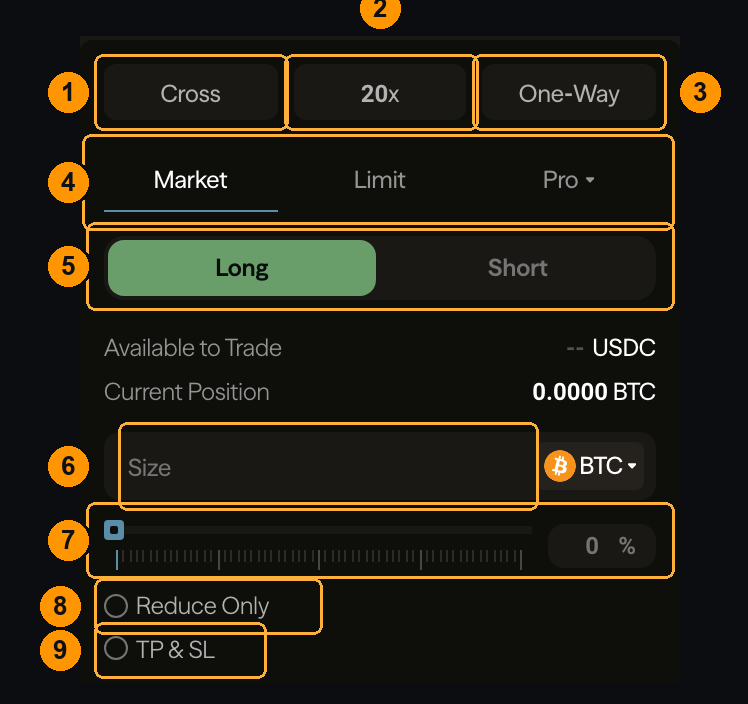 **1 — Margin mode.** `Cross` shares collateral across all your positions; `Isolated` confines a position to the margin you assign it. Cross is more capital-efficient and lets one bad position pull down the others; isolated caps the damage at what you allocated. See [Margin modes](/trading/margin-modes).
**2 — Leverage.** The multiplier applied to your collateral. Higher leverage means a smaller adverse move reaches your liquidation price. Set this **before** sizing — it changes what a given size costs in margin. See [Leverage](/trading/leverage).
**3 — Position mode.** `One-Way` means one net position per market. The alternative lets long and short exist side by side.
**4 — Order type.** `Market` executes now against resting liquidity. `Limit` rests at a price you choose. `Pro` holds the advanced types — [TWAP](/trading/twap), [scale orders](/trading/scale-orders), and [conditional orders](/trading/conditional-orders).
**5 — Direction.** `Long` profits if the price rises, `Short` if it falls.
**6 — Size.** How much to trade, in the asset or in USDC — use the selector on the right to switch which unit you are typing.
**7 — Percentage slider.** Size as a share of your maximum. Quicker than typing, and it respects your leverage and available collateral.
**8 — Reduce Only.** The order can only shrink an existing position, never open or flip one. Use it whenever you intend to close — it is the safeguard against a closing order accidentally opening the opposite side. See [Reduce-only](/trading/reduce-only).
**9 — TP & SL.** Attach a take-profit and stop-loss at the moment you open. See [TP/SL](/trading/tp-sl).
## Limit order
Choosing `Limit` adds two controls.
**1 — Margin mode.** `Cross` shares collateral across all your positions; `Isolated` confines a position to the margin you assign it. Cross is more capital-efficient and lets one bad position pull down the others; isolated caps the damage at what you allocated. See [Margin modes](/trading/margin-modes).
**2 — Leverage.** The multiplier applied to your collateral. Higher leverage means a smaller adverse move reaches your liquidation price. Set this **before** sizing — it changes what a given size costs in margin. See [Leverage](/trading/leverage).
**3 — Position mode.** `One-Way` means one net position per market. The alternative lets long and short exist side by side.
**4 — Order type.** `Market` executes now against resting liquidity. `Limit` rests at a price you choose. `Pro` holds the advanced types — [TWAP](/trading/twap), [scale orders](/trading/scale-orders), and [conditional orders](/trading/conditional-orders).
**5 — Direction.** `Long` profits if the price rises, `Short` if it falls.
**6 — Size.** How much to trade, in the asset or in USDC — use the selector on the right to switch which unit you are typing.
**7 — Percentage slider.** Size as a share of your maximum. Quicker than typing, and it respects your leverage and available collateral.
**8 — Reduce Only.** The order can only shrink an existing position, never open or flip one. Use it whenever you intend to close — it is the safeguard against a closing order accidentally opening the opposite side. See [Reduce-only](/trading/reduce-only).
**9 — TP & SL.** Attach a take-profit and stop-loss at the moment you open. See [TP/SL](/trading/tp-sl).
## Limit order
Choosing `Limit` adds two controls.
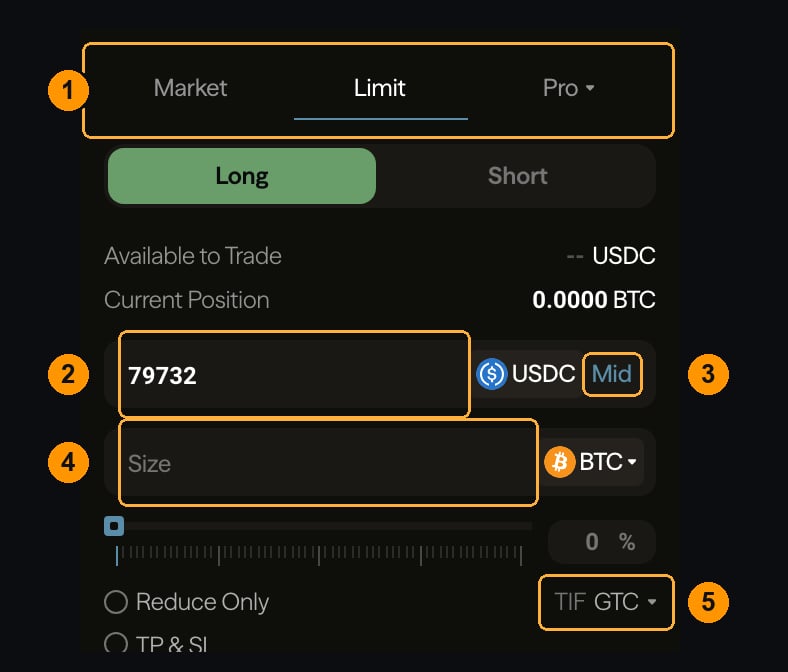 **1 — Order type.** Now on `Limit`.
**2 — Price.** Where your order rests. A buy below the current price waits for the market to come down to it; a buy **above** the current price crosses immediately and pays the taker rate.
**3 — Mid.** Fills the price field with the current mid-market price.
**4 — Size.** As before.
**5 — Time in force.** What happens if the order does not fill immediately:
| | |
| ------- | -------------------------------------------------------------------- |
| **GTC** | Good till cancelled — rests until filled or cancelled |
| **IOC** | Immediate or cancel — fills what it can now, cancels the rest |
| **ALO** | Add liquidity only (post-only) — rejected outright if it would cross |
**ALO is how you guarantee the maker rate.** A limit order is not automatically a maker order — if it crosses on placement it takes liquidity and pays the taker fee. ALO refuses to fill rather than cross. See [Order types](/trading/order-types).
## Read this before you sign
Below the submit button is the cost of the order you have configured.
**1 — Order type.** Now on `Limit`.
**2 — Price.** Where your order rests. A buy below the current price waits for the market to come down to it; a buy **above** the current price crosses immediately and pays the taker rate.
**3 — Mid.** Fills the price field with the current mid-market price.
**4 — Size.** As before.
**5 — Time in force.** What happens if the order does not fill immediately:
| | |
| ------- | -------------------------------------------------------------------- |
| **GTC** | Good till cancelled — rests until filled or cancelled |
| **IOC** | Immediate or cancel — fills what it can now, cancels the rest |
| **ALO** | Add liquidity only (post-only) — rejected outright if it would cross |
**ALO is how you guarantee the maker rate.** A limit order is not automatically a maker order — if it crosses on placement it takes liquidity and pays the taker fee. ALO refuses to fill rather than cross. See [Order types](/trading/order-types).
## Read this before you sign
Below the submit button is the cost of the order you have configured.
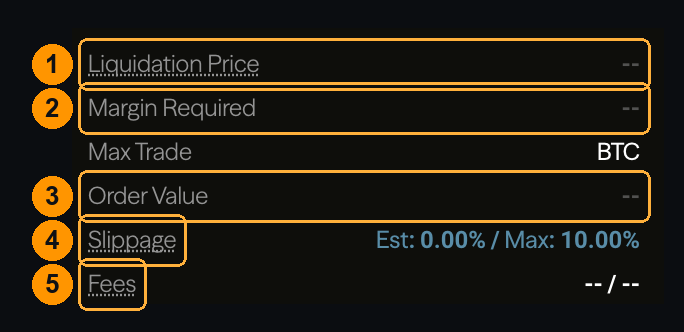 **1 — Liquidation price.** Where this position gets closed by the protocol. **The single most important number on the screen.** If it sits close to the current price, your leverage is too high for the volatility you are trading.
**2 — Margin required.** Collateral this order locks up. It includes an allowance for the fee to close the position later, which is why it is slightly more than size ÷ leverage — see [Trading fees](/programs/fees#why-your-reserved-margin-exceeds-the-initial-requirement).
**3 — Order value.** Total notional exposure — your size multiplied by price.
**4 — Slippage.** For a market order, the estimated gap between the price you see and the price you get, plus the maximum you will accept. If actual slippage would exceed the maximum, the order does not execute at any price.
**5 — Fees.** What this order costs, at your [tier](/programs/fee-tiers). Maker and taker are shown separately because which one applies depends on whether your order rests or crosses.
On a market order, the price in the book is not a promise. You are buying whatever liquidity exists, and in a thin or fast market that can be materially worse than the top of the book. The slippage figure is an estimate from the current book — it is not a guaranteed limit unless you set the maximum.
## Where to go next
These controls used end to end.
The full type list, including the Pro tab.
Why an order did not make it onto the book.
How leverage sets your liquidation distance.
**1 — Liquidation price.** Where this position gets closed by the protocol. **The single most important number on the screen.** If it sits close to the current price, your leverage is too high for the volatility you are trading.
**2 — Margin required.** Collateral this order locks up. It includes an allowance for the fee to close the position later, which is why it is slightly more than size ÷ leverage — see [Trading fees](/programs/fees#why-your-reserved-margin-exceeds-the-initial-requirement).
**3 — Order value.** Total notional exposure — your size multiplied by price.
**4 — Slippage.** For a market order, the estimated gap between the price you see and the price you get, plus the maximum you will accept. If actual slippage would exceed the maximum, the order does not execute at any price.
**5 — Fees.** What this order costs, at your [tier](/programs/fee-tiers). Maker and taker are shown separately because which one applies depends on whether your order rests or crosses.
On a market order, the price in the book is not a promise. You are buying whatever liquidity exists, and in a thin or fast market that can be materially worse than the top of the book. The slippage figure is an estimate from the current book — it is not a guaranteed limit unless you set the maximum.
## Where to go next
These controls used end to end.
The full type list, including the Pro tab.
Why an order did not make it onto the book.
How leverage sets your liquidation distance.