> ## Documentation Index
> Fetch the complete documentation index at: https://docs.intention.xyz/llms.txt
> Use this file to discover all available pages before exploring further.
# Positions and history
> The six tabs at the bottom of the trading screen, and which one answers which question.
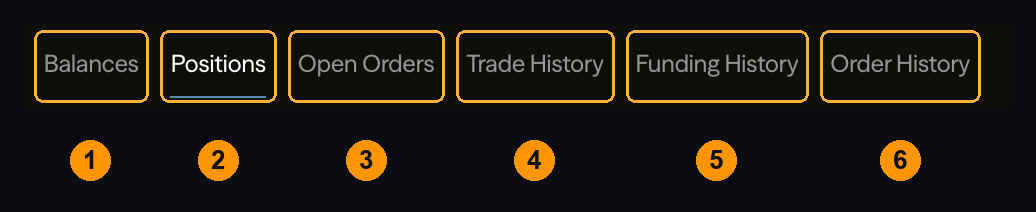 Six tabs, each answering a different question. Most support tickets that begin "my balance changed and I do not know why" are answered by picking the right one.
| Question | Tab |
| ---------------------------------------- | ------------------- |
| What collateral do I have? | **Balances** |
| What am I holding right now? | **Positions** |
| What is still waiting to fill? | **Open Orders** |
| What price did I actually get? | **Trade History** |
| Why did my balance move without a trade? | **Funding History** |
| What happened to the order I placed? | **Order History** |
## Positions
Your open positions, with size, entry price, mark price, unrealized P\&L, and **liquidation price**.
Liquidation price is the number to watch. It is not fixed at open — it moves as you add or remove margin, as funding is charged, and as unrealized P\&L changes your account equity.
## Open Orders
Orders resting on the book, unfilled. Cancel them here.
An order sitting here is not a bug. A limit order rests until the market reaches it, which may be never. If you expected an immediate fill and find the order here instead, you placed a limit order that did not cross — see [Why didn't my order fill](/help/fill-or-pnl-question).
## Trade History vs Order History
The distinction that confuses people most.
**Order History** is what you submitted — every order, including ones that were cancelled or rejected, with their final state.
**Trade History** is what executed — every individual fill, with its price and the fee charged on it.
One order can produce many fills. A market order that consumed three price levels is **one** row in Order History and **three** in Trade History, at three prices. Your effective entry is their weighted average, and because [fees are charged per fill](/programs/fees), you paid three fees.
This is also where to look when the price you got differs from the price you saw. The fills show exactly what happened.
## Funding History
Every [funding](/trading/funding) payment made or received, with the rate and the position it applied to.
It has its own tab because **funding is not a fee and does not appear in Trade History**. If your balance moved and no trade explains it, this is almost always the answer. Positive rate means longs pay shorts; if you are short with positive funding, this tab is showing you income.
## Balances
Collateral by asset, split into what is available and what is committed to margin.
Available balance is lower than total whenever you have a position open — the difference is backing that position, and it cannot be withdrawn while the position needs it.
## Filtering
`Filter` and `Current Symbol` narrow every tab to one market. Useful when you trade several and are reconstructing what happened in one of them.
## Where to go next
When the fill and the screen disagree.
How the rate is built and when it settles.
Why a fee appears per fill rather than per order.
Acting on what you see here.
Six tabs, each answering a different question. Most support tickets that begin "my balance changed and I do not know why" are answered by picking the right one.
| Question | Tab |
| ---------------------------------------- | ------------------- |
| What collateral do I have? | **Balances** |
| What am I holding right now? | **Positions** |
| What is still waiting to fill? | **Open Orders** |
| What price did I actually get? | **Trade History** |
| Why did my balance move without a trade? | **Funding History** |
| What happened to the order I placed? | **Order History** |
## Positions
Your open positions, with size, entry price, mark price, unrealized P\&L, and **liquidation price**.
Liquidation price is the number to watch. It is not fixed at open — it moves as you add or remove margin, as funding is charged, and as unrealized P\&L changes your account equity.
## Open Orders
Orders resting on the book, unfilled. Cancel them here.
An order sitting here is not a bug. A limit order rests until the market reaches it, which may be never. If you expected an immediate fill and find the order here instead, you placed a limit order that did not cross — see [Why didn't my order fill](/help/fill-or-pnl-question).
## Trade History vs Order History
The distinction that confuses people most.
**Order History** is what you submitted — every order, including ones that were cancelled or rejected, with their final state.
**Trade History** is what executed — every individual fill, with its price and the fee charged on it.
One order can produce many fills. A market order that consumed three price levels is **one** row in Order History and **three** in Trade History, at three prices. Your effective entry is their weighted average, and because [fees are charged per fill](/programs/fees), you paid three fees.
This is also where to look when the price you got differs from the price you saw. The fills show exactly what happened.
## Funding History
Every [funding](/trading/funding) payment made or received, with the rate and the position it applied to.
It has its own tab because **funding is not a fee and does not appear in Trade History**. If your balance moved and no trade explains it, this is almost always the answer. Positive rate means longs pay shorts; if you are short with positive funding, this tab is showing you income.
## Balances
Collateral by asset, split into what is available and what is committed to margin.
Available balance is lower than total whenever you have a position open — the difference is backing that position, and it cannot be withdrawn while the position needs it.
## Filtering
`Filter` and `Current Symbol` narrow every tab to one market. Useful when you trade several and are reconstructing what happened in one of them.
## Where to go next
When the fill and the screen disagree.
How the rate is built and when it settles.
Why a fee appears per fill rather than per order.
Acting on what you see here.